27

I'm running into a situation where a cron job I thought was running every 55 minutes is actually running at 55 minutes after the hour and at the top of the hour. Actually, it's not a cron job, but it's a PHP scheduling application that uses cron syntax.

When I ask this application to schedule a job every 55 minutes, it creates a crontab line like the following.

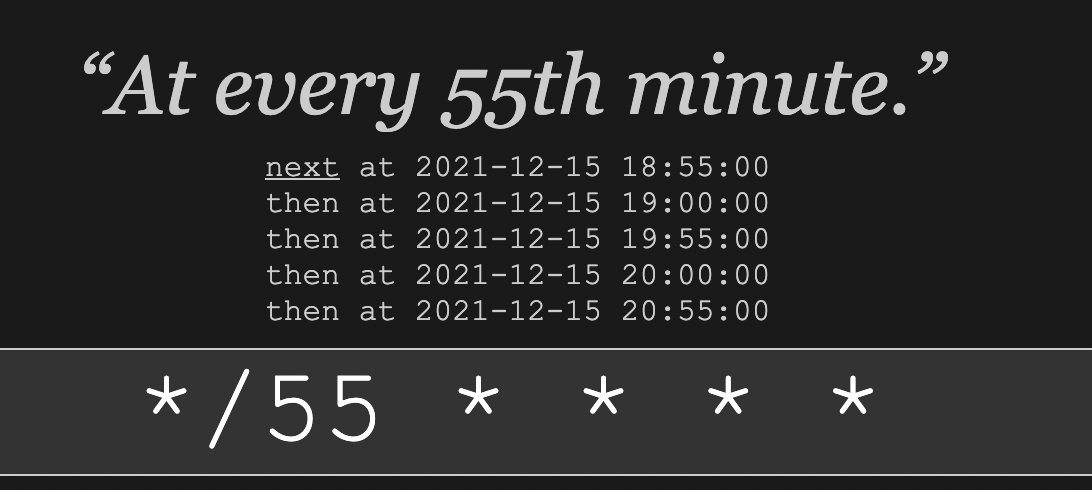
*/55 * * * *

This crontab line ends up not running a job every 55 minutes. Instead a job runs at 55 minutes after the hours, and at the top of the hour. I do not desire this. I've run this though a cron tester, and it verifies the undesired behavior is correct cron behavior.

This leads me to looking up what the / actually means. When I looked at the cron manual I learned the slash indicated "steps", but the manual itself is a little fuzzy on that that means

Step values can be used in conjunction with ranges. Following a range with "<number>" specifies skips of the number's value through the range. For example, "0-23/2" can be used in the hours field to specify command execution every other hour (the alternative in the V7 standard is "0,2,4,6,8,10,12,14,16,18,20,22"). Steps are also permitted after an asterisk, so if you want to say "every two hours", just use "*/2".

The manual's description ("specifies skips of the number's value through the range") is a little vague, and the "every two hours" example is a little misleading (which is probably what led to the bug in the application)

So, two questions:

  1. How does the unix cron program use the "step" information (the number after a slash) to decide if it should skip running a job? (modular division? If so, on what? With what conditions deciding a "true" run, and which decisions not? Or is it something else?)

  2. Is it possible to configure a unix cron job to run every "N" minutes?

4
  • @shellter I don't want to run it at only 55 after the hour, I want to run it every 55 minutes. Running at 55 after the hours would be once an hour. More to my question, I want to know how the "steps" feature actually works, and if it's possible to say "every N minutes" irrespective of what N is. Commented Dec 10, 2014 at 23:16
  • To the down-vote/closer -- this question is about how cron's scheduling logic is programmed, in support of writing software against a PHP package that uses cron logic. That seems pretty on-topic Commented Dec 11, 2014 at 17:18
  • I think it's a good design choice that it works this way. Think of it as about something that gives you predictable results no matter when you started the cron. The pattern itself always tells you clearly when it's about to be fired. If that wasn't the case, it wouldn't be easy to figure out the actual schedule. Commented Dec 20, 2018 at 16:47
  • If this PHP application refers to */55 * * * *, I'd argue that's a bug in the PHP application. Commented Jan 2 at 22:56

3 Answers 3

37

Step values can be used in conjunction with ranges. Following a range with "<number>" specifies skips of the number's value through the range. For example, "0-23/2" can be used in the hours field to specify command execution every other hour (the alternative in the V7 standard is "0,2,4,6,8,10,12,14,16,18,20,22"). Steps are also permitted after an asterisk, so if you want to say "every two hours", just use "*/2".

The "range" being referred to here is the range given before the /, which is a subrange of the range of times for the particular field. The first field specifies minutes within an hour, so */... specifies a range from 0 to 59. A first field of */55 specifies all minutes (within the range 0-55) that are multiples of 55 -- i.e., 0 and 55 minutes after each hour.

Similarly, 0-23/2 or */2 in the second (hours) field specifies all hours (within the range 0-23) that are multiples of 2.

If you specify a range starting other than at 0, the number (say N) after the / specifies every Nth minute/hour/etc starting at the lower bound of the range. For example, 3-23/7 in the second field means every 7th hour starting at 03:00 (03:00, 10:00, 17:00).

This works best when the interval you want happens to divide evenly into the next higher unit of time. For example, you can easily specify an event to occur every 1, 2, 3, 4, 5, 6, 10, 12, 15, 20, or 30 minutes, or every 1, 2, 3, 4, 6, or 12 hours. (Thank the Babylonians for choosing time units with so many nice divisors.)

Unfortunately, cron has no concept of "every 55 minutes" within a time range longer than an hour.

If you want to run a job every 55 minutes (say, at 00:00, 00:55, 01:50, 02:45, etc.), you'll have to do it indirectly. One approach is to schedule a script to run every 5 minutes; the script then checks the current time, and does its work only once every 11 times it's called. Such a script would need to allow for some drift; a cron job scheduled for 00:00 might actually run a second or two later, or more if the system is heavily loaded or something goes wrong.

Or you can use multiple lines in your crontab file to run the same job at 00:00, 00:55, 01:50, etc. -- except that a day is not a multiple of 55 minutes. If you don't mind having a longer or shorter interval once a day, week, or month, you can write a program to generate a large crontab with as many entries as you need, all running the same command at a specified time.

Sign up to request clarification or add additional context in comments.

6 Comments

Thank you Keith, that's more helpful than the manual. Is "multiples" the right term? If I specify "1-59/55" I end up with a job that runs at 1 after the hour and 56 after the hour. Would it be more accurate to say a step will 1. Always run for the first number of a range 2. Then run ahead by the amount specified in the range, and run if the resulting skip ahead is still in the same range 3. Repeat 2 until the resulting skip ahead is NOT in the same range
Thanks Kieth, always takes at least two programmers to screw in a light bulb the right way :)
Does it mean for months (which start from 1), that */2 are odd months or even? And is there a difference between */2 and 1-12/2 month then?
@CatherineTsokur: Hmm, that's a good question. Both month and day of month are 1-based. The man page specifically says that * always stands for first-last, so I believe that */2 in the month field is equivalent to 1-12/2, which would mean months 1, 3, 5, 7, 9, and 11. Perhaps I'll try an experiment (but it will take a while).
Thanks for the reply! Was already experimenting with it, indeed, the world will never be the same again, but */2 for months is not even, but odd. So you are right */2 and 1-12/2 gives the same result: 1, 3, 5, 7, 9, 11. To get even month we should do 2-12/2 to start from 2 with step 2.
|
4

I came across this website that is helpful with regard to cron jobs.

https://crontab.guru

And specific to your case with * /55 https://crontab.guru/#*/55_*_*_*_*

It helped to get a better understanding of the concept behind it.

Cron Job at */55

Comments

1

There is another tool named at that should be considered. It can be used instead of cron to achieve what the topic starter wants. As far as I remember, it is pre-installed in OS X but it isn't bundled with some Linux distros like Debian (simply apt install at).

It runs a job at a specific time of day and that time can be calculated using a complex specification. In our case the following can be used:

You can also give times like now + count time-units, where the time-units can be minutes, hours, days, or weeks and you can tell at to run the job today by suffixing the time with today and to run the job tomorrow by suffixing the time with tomorrow.

The script every2min.sh is executed every 2 minutes. It delays next execution every time the instance is running:

#!/bin/sh
at -f ./every2min.sh now + 2 minutes
echo "$(date +'%F %T') running..." >> /tmp/every2min.log

Which outputs

2019-06-27 14:14:23 running...
2019-06-27 14:16:00 running...
2019-06-27 14:18:00 running...

As at does not know about "seconds" unit, the execution time will be rounded to full minute after the first run. But for a given task (with 55 minutes range) it should not be a big problem.

There also might be security considerations

For both at and batch, commands are read from standard input or the file specified with the -f option and executed. The working directory, the environment (except for the variables BASH_VERSINFO, DISPLAY, EUID, GROUPS, SHELLOPTS, TERM, UID, and _) and the umask are retained from the time of invocation.

This is the easiest way to schedule something to be ran every X minutes I've seen so far.

Comments

Your Answer

By clicking “Post Your Answer”, you agree to our terms of service and acknowledge you have read our privacy policy.

Start asking to get answers

Find the answer to your question by asking.

Ask question

Explore related questions

See similar questions with these tags.