Guide
Creating new Weapons using the Toolkit
Step 1: Create a new Project (or load an existing one) in the Toolkit.
You can see various official guide here on this matter :
- Installing the Toolkit
- Getting Started guide
- Creating a New Mod
- Weapon Creation
- Search of Guide with Official tag.
Step 2: Creating new Daggers.
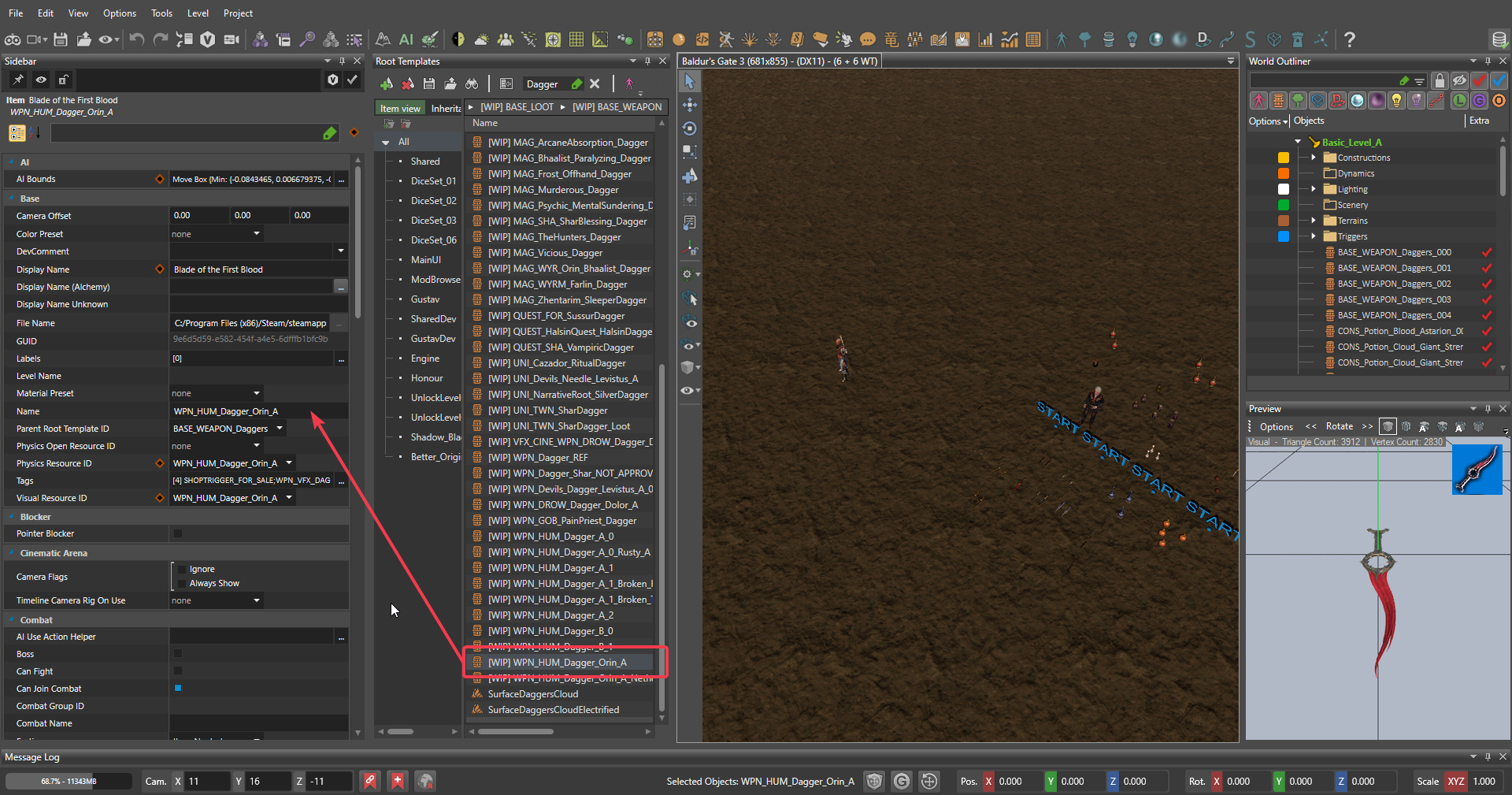
- In the Root Template manager, search for "Dagger" and chose a dagger of your liking, for example this I'll choose
WPN_HUM_Dagger_Orin_Aas you can see on the picture below :
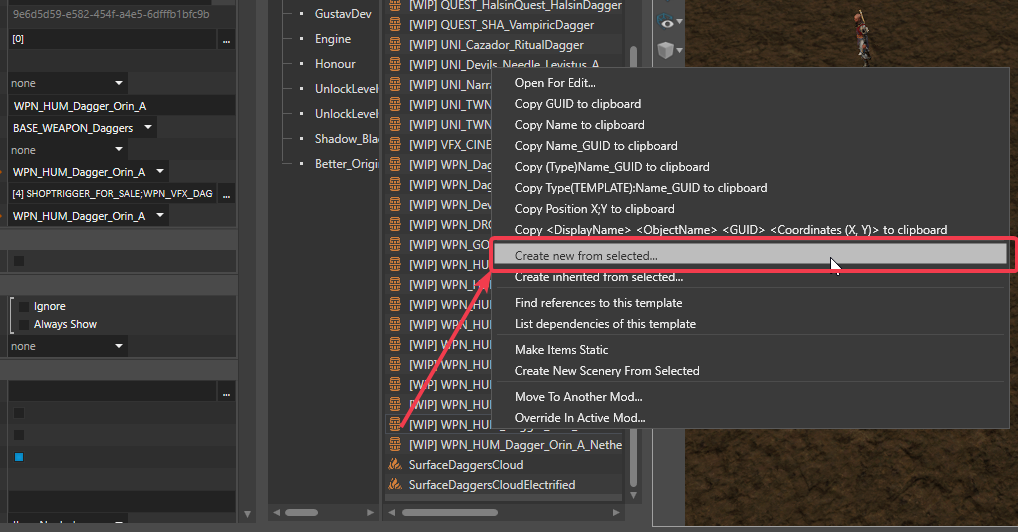
- Click on the dagger, and select "Create New from Selected" in the contextual menu :

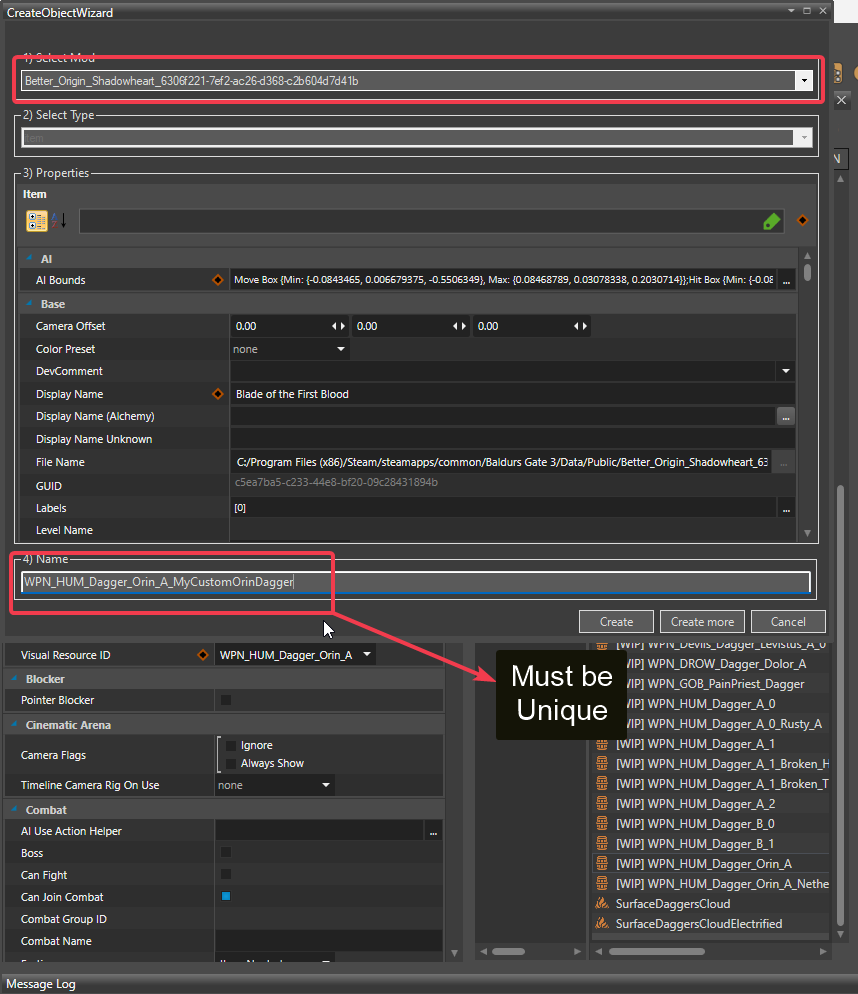
- In the Wizard creator menu that pop up, make sure you have select your mod on top and rename your custom dagger to an appropriate unique name, then click Create button.

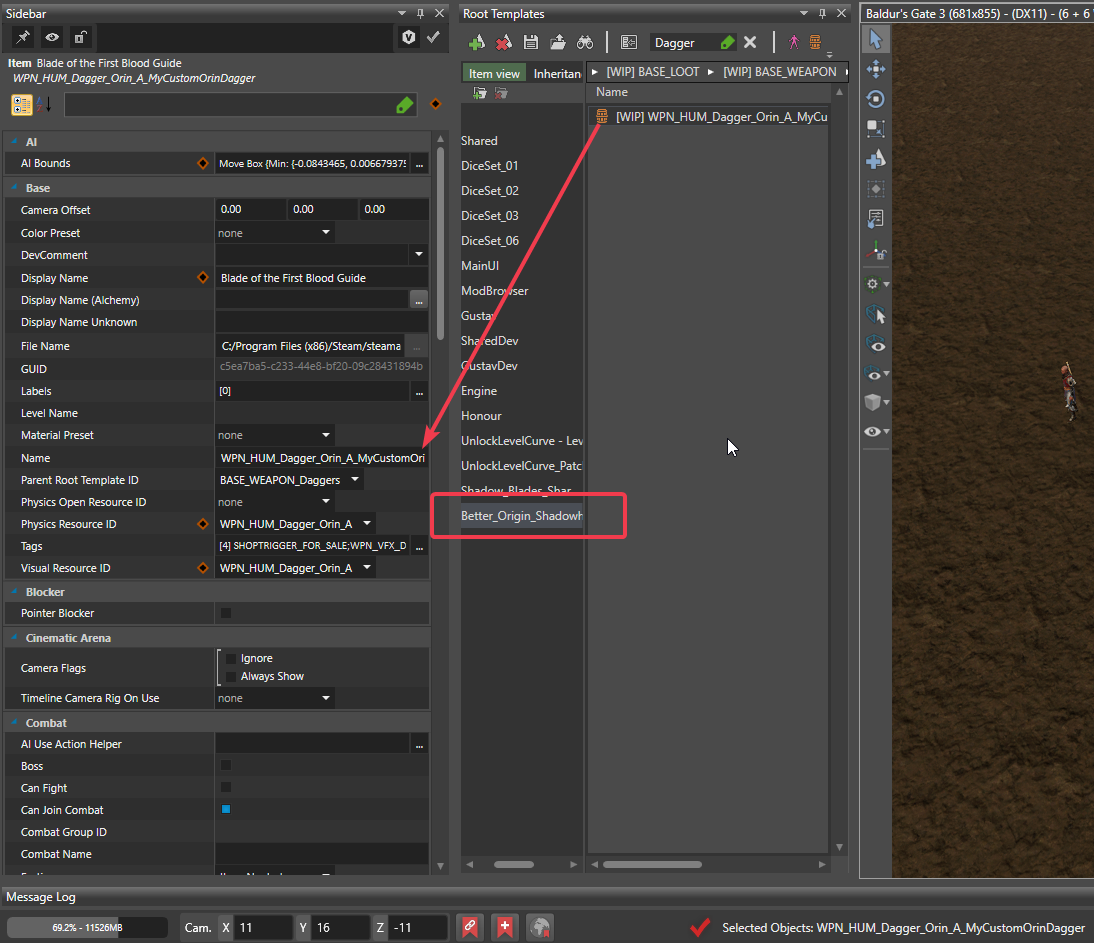
- You should now see your dagger when you click on your mod in the Root Template manager.
To be sure everything is in order, I suggest saving, switch to Game and restarting the Toolkit. This is optionnal, but good habits to take.
- In order for my mod to work with your custom dagger, you need to create a unique TAG for your weapon that will be used for conditionnal effects in the Throw ability we'll talk about later.
For this open the Tag Editor :
- In the Tag Editor, type
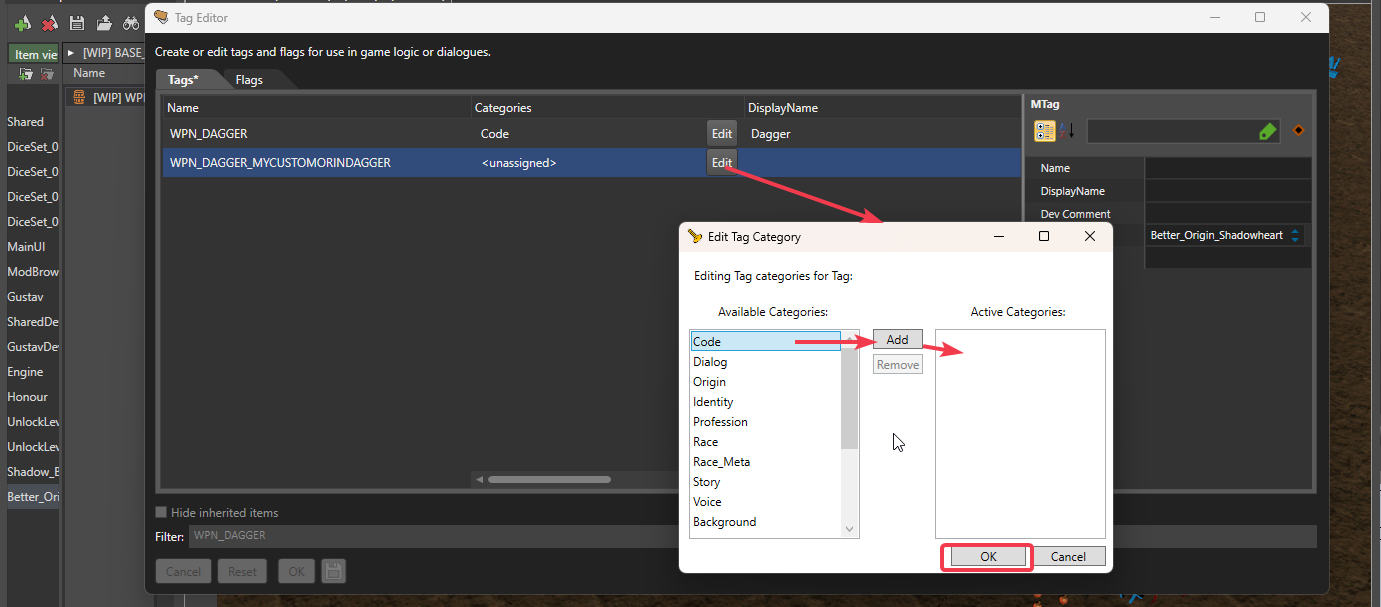
WPN_DAGGERon the search bar and create a new Tag by clicking the empty line right belowWPN_DAGGER. Name itWPN_DAGGER_IDENTIFIERwith IDENTIFIER being something on your own that must be unique. You can use that IDENTIFIER in both the Root Template and the Tag for more clarity.
Select the Edit button under Categories and choose Code (double click or click Add) then click Ok.
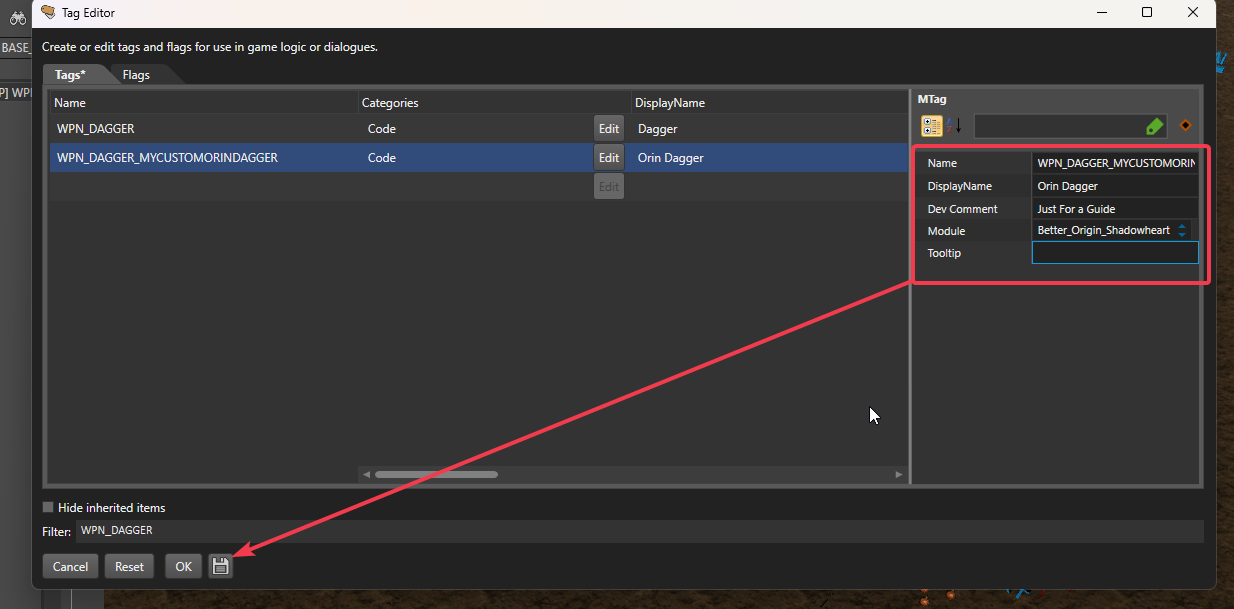
- Save your tag by clicking any of the field on the right, then click the Save button and click OK to close the Tag Editor.

- On the Root Template manager, click your custom Dagger. You should see your Dagger appearing on the Sidebar selection.
If the entries on the left are covered with red background, just Switch to Game (Gamepad button) and switch back to Editor.
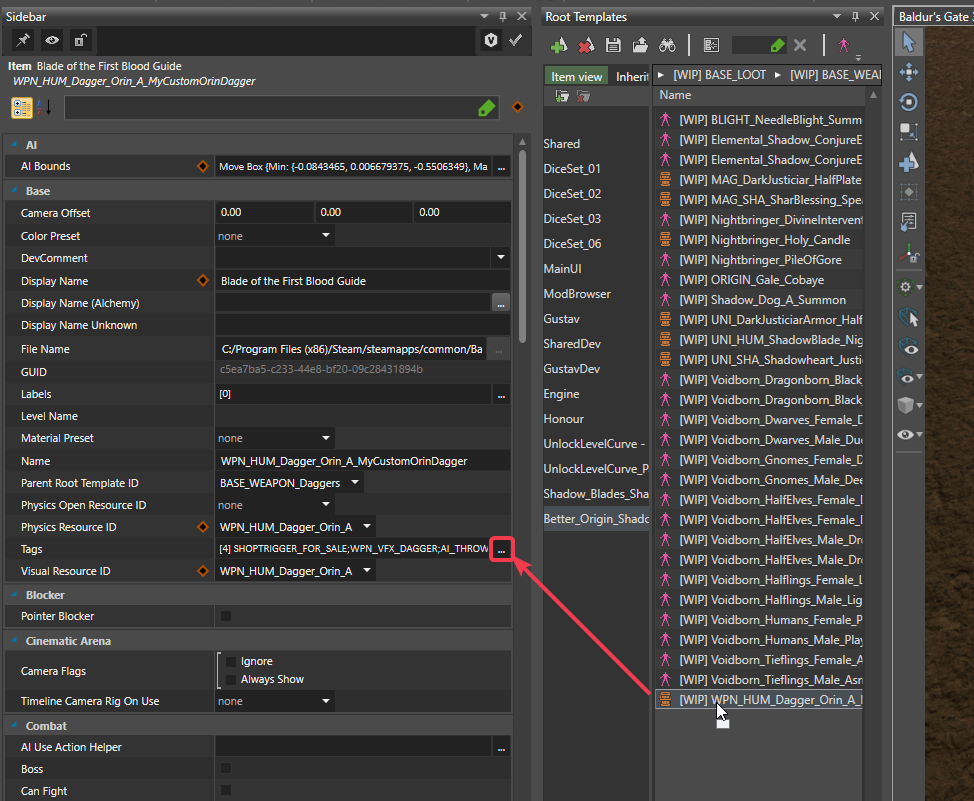
Next to the Tags line in the Root Template definition, click the 3 dots.
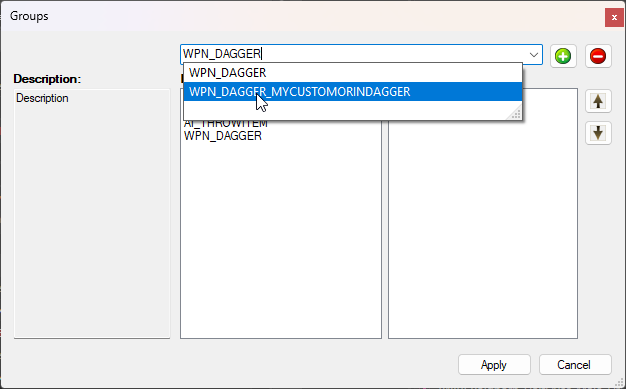
- On the new window, search for WPN_DAGGER on the top and select your custom tag that should be name WPN_DAGGER_IDENTIFIER.
Click the green + button and press Apply button. Save your Root Template and restart your Toolkit.
Note : If your tag doesn't appear in there, double check your Tag has been saved then restart the Toolkit. Once you've loaded a Level (always load Basic_Level_A unless you wanna do Character Creation things), click on your dagger in the Root Template manager, it should appear with Red flags. Switch to Game then switch Back to Editor, try to click again on your Dagger in the Root Template manager : it should now display everything properly and your dagger is properly loaded in the game engine. To be sure, you can use the ReCon command "spawnItem" in the Game mod, press tab, type partial name of your dagger and it should appears on the Console menu. Double click on it then press enter : it will spawn your dagger in the game. It spawn it under your cursor.
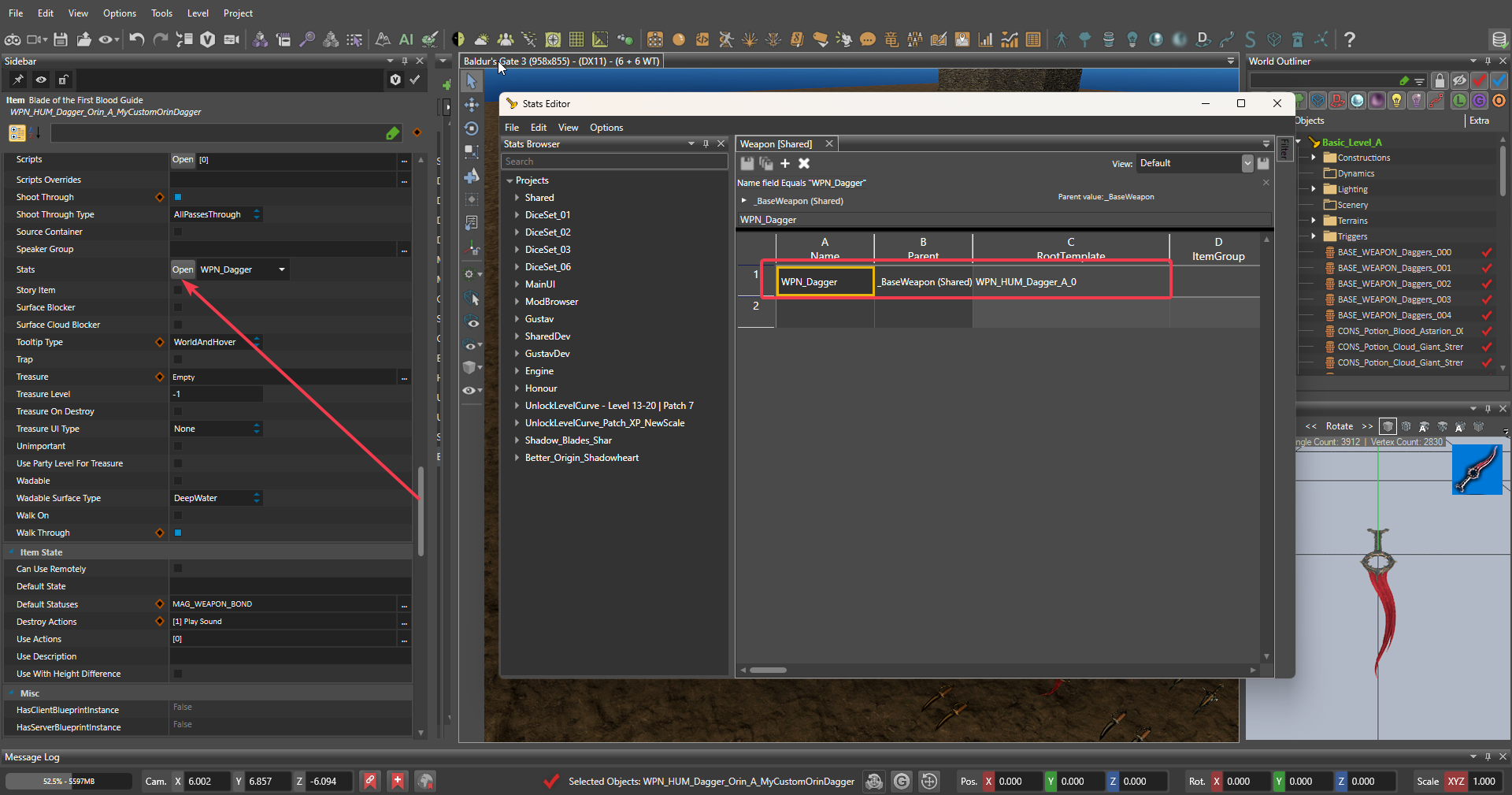
- On your Root Template sheet on the Sidebar, scroll down a bit until you see the Stats line and click the Open button. This will open the Stat Editor.

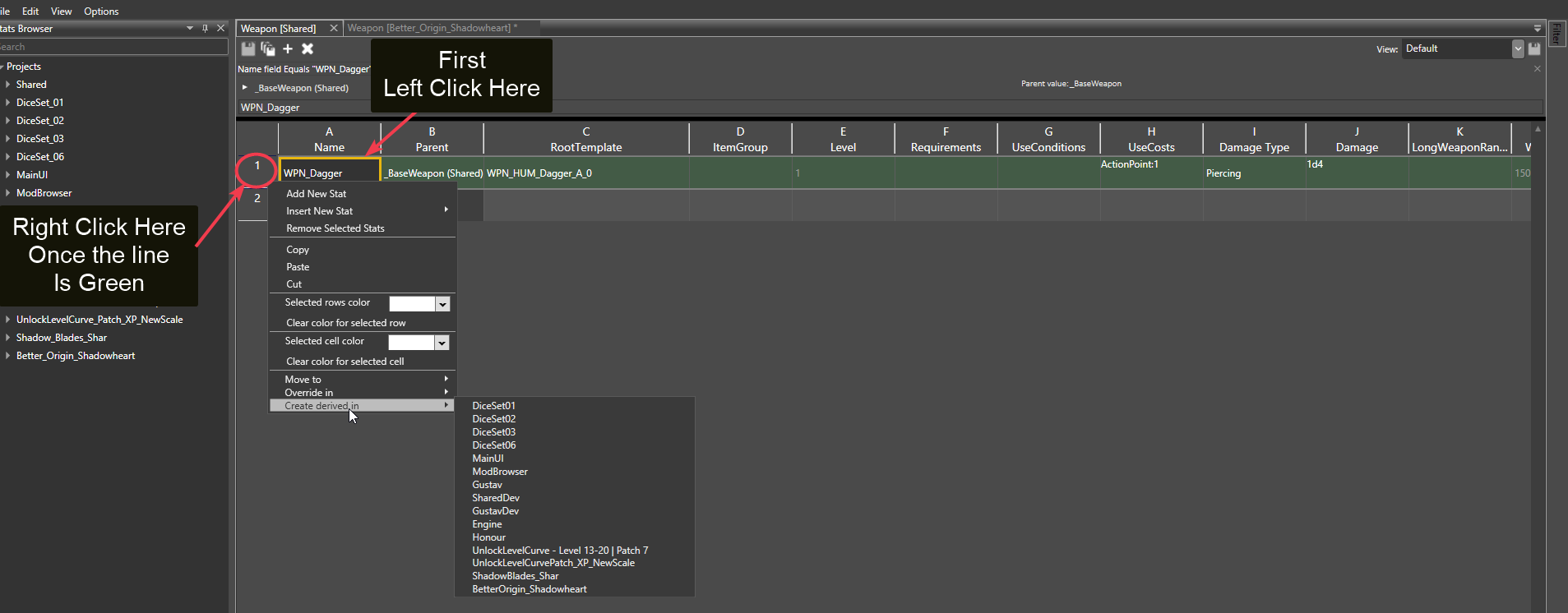
- Click on the first cell under Name then click on the number next to it to select the entiere line.
Then right click and select "Override in" and select your mod.
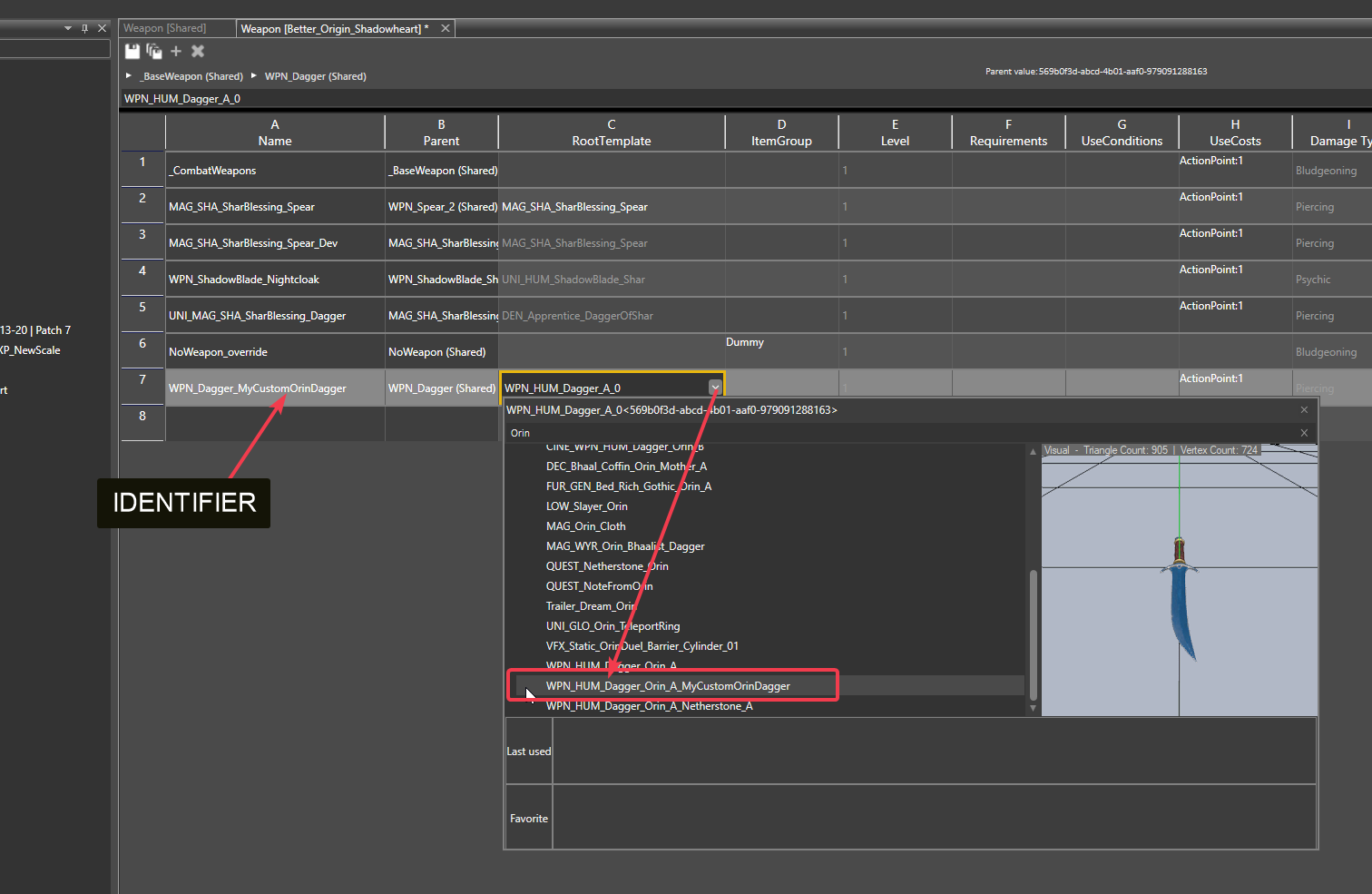
- In the window that open, rename your Stat entry appropriately and attach it to your Root Template.
Once this is done, save the stats and reload stats by clicking File -> Reload Stats Files in the Stats Editor then close the Stats Editor.
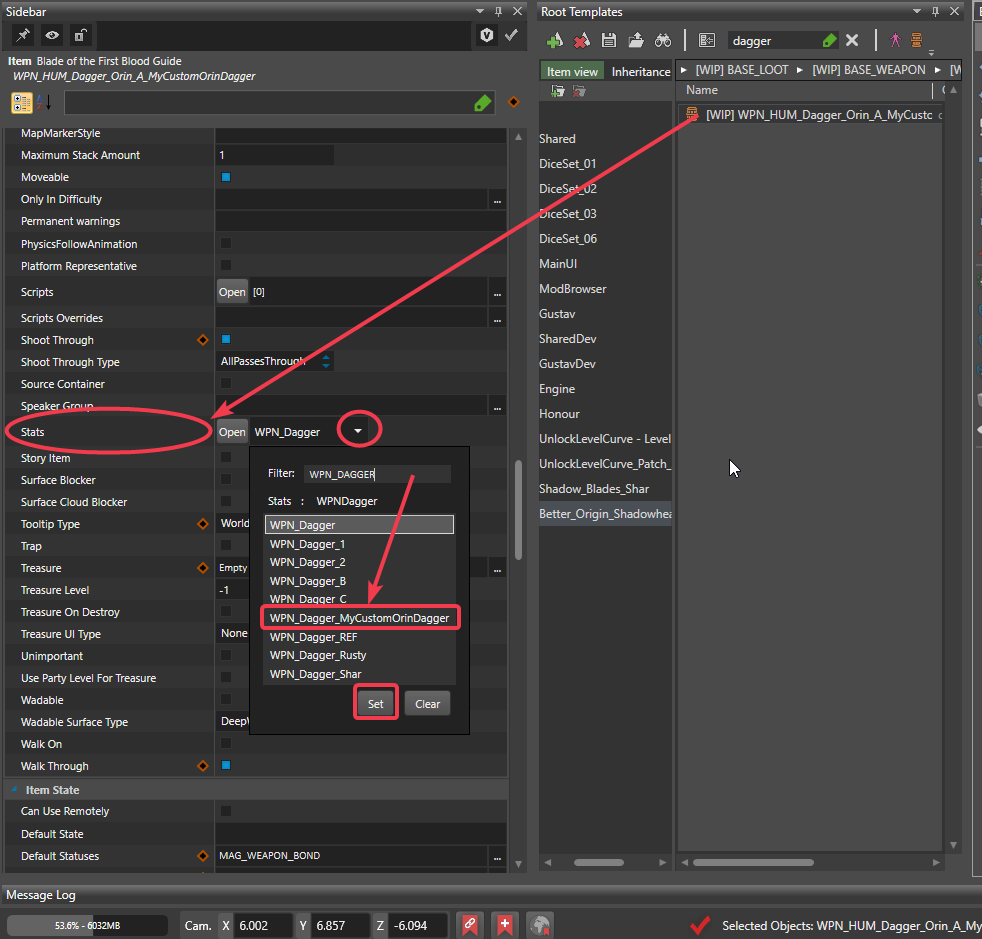
- Attach the Stat Entry to your Dagger in the Root Template sheet by selecting it in the menu you trigger when you click on the contextual arrow next to Stats like before.

- Save your Root Template and restart your Toolkit. You can now modify your custom Dagger effects directly in the Stat Editor. There 2 ways of adding Magical property to a weapon.
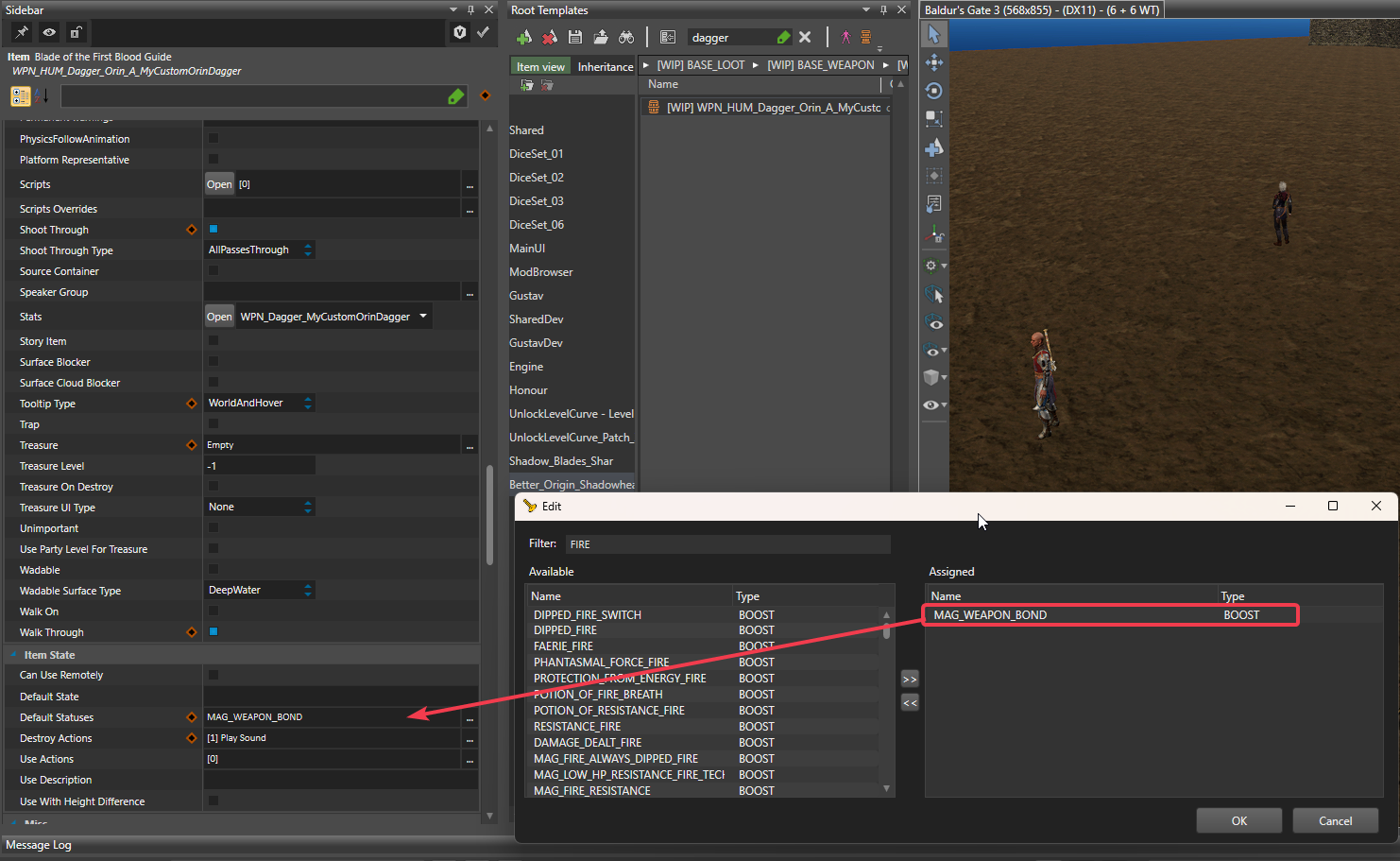
a) You can add default Status_BOOST or Status_EFFECT to your weapon directly in the Root Template sheet. If you scroll down a bit after Stats you will see under Item State a line called Default Statuses. Here you can click the 3 dots and select whatever Status you want. This is especially useful to add VFX to a weapon as you can attach a special StatusEffect VFX to any Status. The most common Boost to apply to a weapon isWeaponDamage(1d4, Fire, Magical)if you attach a Status with this entry under its column "Boost" it will simply give the weapon 1d4 additionnal Fire damage, that's how the famous Great Firesword you can get in the Nautiloïd works.
Note : If you want your weapon to hold specific Auras, then it's better to avoid having it bound, so you may remove the MAG_WEAPON_BOUND status for that. If you want your dagger to come back to your hand after throwing you can actually ADD the MAG_WEAPON_BOUND status this way.
b) The second method is directly through the Stat Editor. Open the previously created Stat in the Stat Editor and scroll right til you see "DefaultBoost" collumn. The following column are the one which interest us.
If you want to add magical damage to the weapon directly, then you'd typeWeaponDamage(1d4, Cold)under the column "DefaultBoost".
Everything else, i.e. if you want to add passive, statuses and bonuses to the player that hold the weapon, all this goes into the "BoostsOnEquip" and "PassivesOnEquip" column.
- And that's it for the Dagger creation. You may now proceed to the Step 3.


Step 3 : Adding your custom Dagger in the Throw Dagger ability.
So now we have our magical weapon which only have that simple effect : WeaponDamage(1d4, Necrotic) well sadly this effect is not automatically applied when the dagger is thrown and that's why I was forced to do all that. So since this effect is not applied on-throw we're basically adding it manually to the Throw ability, or to be precise to our custom Throw_Dagger ability (this way to avoid overriding the base Throw ability).
First we need to make sure you have SB_Shar_ThrowDagger as a dependency for your mod. For this, click on the Project setting as shown on the picture below, select SB_Shar_ThrowDagger mod and click on the Left arrow, then Save. It will reload your project.
Once this is done, you can proceed with the following steps :
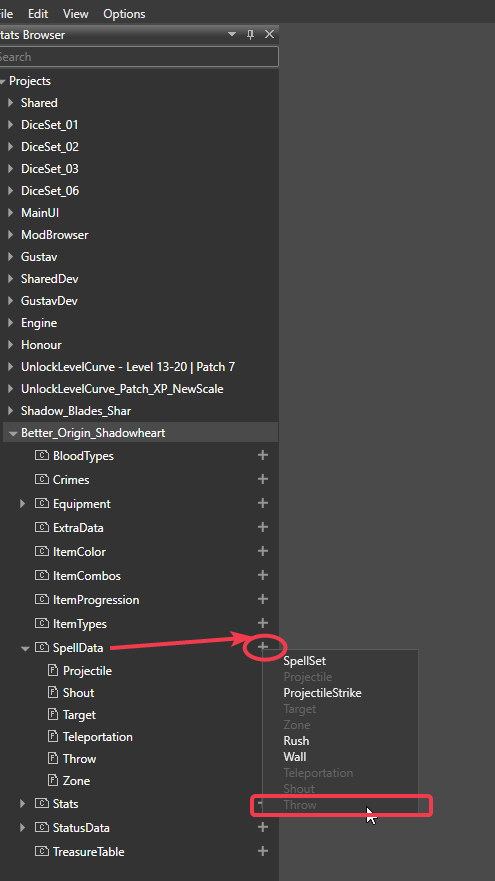
- Open the Stats Editor and click on your mod on the left menu, then click on the plus next to SpellData and click Throw to create the Spell_Throw file as shown on the picture below.
Double-Click on the file created to open it.
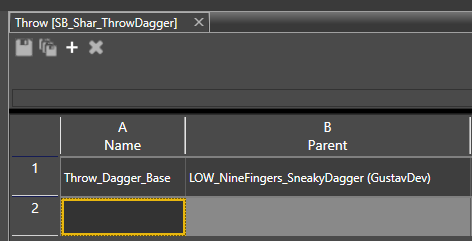
- On the empty line, fill the first two cells like on the picture below :

- Now you will have to modify the following cells under the corresponding column with the text I've wrote in code balise :
Cooldown :None
SpellSuccess :TARGET:IF(HasWeaponProperty(WeaponProperties.Thrown,context.HitDescription.ThrownObject)):DealDamage(ThrownWeapon, ThrownWeaponDamageType);TARGET:IF(HasStatus('SHADOWBLADE_DELETE_TRIGGER', context.HitDescription.ThrownObject)):DealDamage(1d6,Force,Magical);TARGET:IF(HasStatus('SHA_SHADOW_BLADE_EFFECTONLY', context.HitDescription.ThrownObject)):DealDamage(1d4,Cold,Magical);TARGET:IF(HasStatus('MAG_NECROTIC_NECROTIC_WEAPON', context.HitDescription.ThrownObject)):DealDamage(1d4,Necrotic,Magical);TARGET:IF(Tagged('SHAR_MURDERDAGGER', context.HitDescription.ThrownObject) and (HasStatus('SLEEPING', context.Target) or HasStatus('SG_Sleeping_Magical', context.Target) or HasStatus('SLEEP', context.Target) or HasStatus('KNOCKED_OUT', context.Target))):DealDamage(1d4, Necrotic,Magical);TARGET:IF(Tagged('SHAR_THEHUNTERS_DAGGER', context.HitDescription.ThrownObject)):ApplyStatus(BARBED_ARROW, 100, 3);TARGET:IF(Tagged('SHAR_MURDEROUS_DAGGER', context.HitDescription.ThrownObject) and HasHPPercentageEqualOrLessThan(50, context.Target)):DealDamage(1d4, Piercing);TARGET:IF(Tagged('SHAR_PAINPRIEST_DAGGER', context.HitDescription.ThrownObject)):ApplyStatus(SELF,GOB_PAIN_PRIEST_DAGGER_BLESS,100,1);TARGET:IF(Tagged('SHAR_SUSSURDAGGER', context.HitDescription.ThrownObject)):ApplyStatus(SILENCED,100, 2);TARGET:IF(Tagged('SHAR_CAZADOR_RITUALDAGGER', context.HitDescription.ThrownObject)):ApplyStatus(BLEEDING,100,2);TARGET:IF(Tagged('SHAR_DAGGEROFSHAR', context.HitDescription.ThrownObject) and not IsInSunlight()):DealDamage(1d6,Necrotic,Magical);
ThrowableSpellSuccess :IF(Character()):ApplyStatus(PRONE_AFTER_THROW,100,1);IF(Tagged('SHAR_ORIN_BHAALIST_DAGGER')):ApplyStatus(MAG_SHAR_AURA_OF_MURDER_AURA,100,1d4);IF(Tagged('SHAR_SHADOWBLADE_RING')):ApplyStatus(COL_RESONANCESTONE_AURA,100,1d4)
Icon :PassiveFeature_ExtraAttack
DisplayName :Throw Dagger
Description :Throw a dagger at your target, dealing weapon damage and applying your weapon <LSTag Tooltip="MeleeWeaponAttack">Attack</LSTag> effects. The thrown dagger also applies any <LSTag Type="Status" Tooltip="WEAPON_COATED_WITH_POISON">Poison</LSTag> it is coated with.
ExtraDescription :You always use your <LSTag Tooltip="Dexterity">Dexterity</LSTag> modifier when <LSTag Tooltip="Thrown">throwing</LSTag> a dagger, if it is higher than your <LSTag Tooltip="Strength">Strength</LSTag>.
TooltipDamageList :DealDamage(MainMeleeWeapon, MainWeaponDamageType) - Now you have mirrored my Throw spell in your mod, you will have to add your own custom effect from your custom Dagger. For this, you want to use this template :
TARGET:IF(Tagged('SHAR_SUSSURDAGGER', context.HitDescription.ThrownObject)):ApplyStatus(SILENCED,100, 2);
In that example 'SHAR_SUSSURDAGGER' is the tag I use for Sussur dagger. You will use your own custom TAG you created in Step 1. In my case it was WPN_DAGGER_MYCUSTOMORINDAGGER. The functor you apply can be anything. For Sussur Dagger it is "ApplyStatus(...)" but you could say "DealDamage(1d4, Necrotic)" if the weapon had a passive that make it deal additionnal elemental damage on hit, could apply other status as well. If you want to apply a status to the thrower, then you would write "ApplyStatus(SELF, BLESS, 100, 3)" if you'd want to apply Bless effect on yourself for 3 turns.
The previous line of code should be directly pasted in the SpellSuccess cell, after any of the ";" already in. You can add it directly after the 1st ";" because it's easier this way, but just make sure your line finishes with a ";" and separate well the following TARGET:IF... - And that's it ! Save your mod, reload your stats, restart your Toolkit and you can then test. In Game mod, open the ReCon console with F11 and type "Add" and press tab. Type "Throw_Throw" and select "Throw_Throw_Dagger_Base" in the left menu (double click) and press enter. That is if you do not already have the spell in your action bar.
Then type "spawn" and press tab, type a part of your custom Dagger name like "Orin" in my case. Find your custom Dagger, double click on it. Close any other in-game menu and click again on the consol then pres enter. It will spawn your custom Dagger under your cursor. Now you can close the ReCon console and test to Throw your custom Dagger to see if it works.
Step 4 :
Well there isn't really any Step 4, that's basically the whole thing. But for conclusion, just a quick guideline on how to incorporate it into the game.
- Open your mod Project Settings like earlier, fill the requiered field and press "Publish Local".
- Make sure you select a different folder, like a new folder you'd create on your Desktop to store your mod .pak file. Do not publish locally in the default folder (which is the game folder).
- Install your mod by simply pasting the .pak file in your AppData\...\Mods folder like any other 3rd Party mod (Nexus Mods).
- Open your BG3MM (BG3 Mod Manager) and make sure your Mod is loaded after its dependancy SB_Shar_ThrowDagger.
- Start your game and test if it works.
Discussion 0 comments
I explain you in details how to create new custom Daggers and add theim to the list of daggers that apply their on-hit effect in your own SB_Shar_ThrowDagger custom mod.

mod.io uses essential cookies to make our site work. With your consent, we may also use non-essential cookies to enhance your experience and understand how you interact with our services. The latter will be set only upon approval. or read our Cookies Policy.